
Client Portal 2.0 shows how to turn a traditional client app into a secure, AI-driven self-service experience using .NET MAUI, Azure B2C, and Azure OpenAI. The post explains how to combine strong identity, tenant-aware data access, and retrieval-augmented generation so clients get instant, contextual answers from their own data. It also covers multi-layer prompt safety, backend guardrails, and optional NVIDIA-based confidential computing for highly sensitive workloads. Readers will learn an architecture that works for small firms and scales up to enterprise, improving customer satisfaction while reducing support load and security risk.
Client portals have evolved from static repositories of documents into intelligent service delivery platforms. The next generation of client portal architecture combines secure identity management, AI-powered self-service capabilities, and data access boundaries to improve client experience while maintaining enterprise-grade security.
This technical deep-dive explores how to modernize client experiences by building a secure, AI-driven self-service mobile portal using .NET MAUI for cross-platform iOS/Android delivery and Azure AD B2C for bank-grade identity management. We'll demonstrate how integrating an AI Concierge powered by retrieval-augmented generation (RAG) can enable significant support volume reductions-commonly in the 40-60% range based on early enterprise pilots-while maintaining security and compliance standards through strict data access boundaries.
For small and mid-size teams, the same Client Portal 2.0 architecture scales down cleanly, starting with Azure AD B2C, role-based data boundaries, and lightweight prompt safety, with options to adopt NVIDIA confidential computing and advanced guardrails later as regulatory and scale requirements grow.
The key insight: AI doesn't increase risk when you architect for it from the ground up. By combining federated authentication, role-based data access controls, and prompt safety guardrails, you can deploy intelligent self-service experiences that reduce client support overhead, improve satisfaction metrics, and strengthen compliance posture simultaneously.
Note on Impact Metrics: The support cost reduction figures and adoption trends cited in this section reflect directional industry patterns observed in early AI-powered self-service implementations, analyst commentary, and vendor case studies. Actual results vary significantly based on query complexity, knowledge base quality, user adoption, and organizational context. Treat these as illustrative benchmarks rather than guaranteed outcomes.
The trends are clear. Analyst and industry reports consistently show a meaningful increase in successful self-service interactions through 2026, driven by growing trust in generative AI among both decision-makers and end users. Many studies also indicate that a strong majority of customers now attempt self-service before seeking human help.
For service-based organizations-law firms, case management, healthcare, financial services-this shift is transformative:
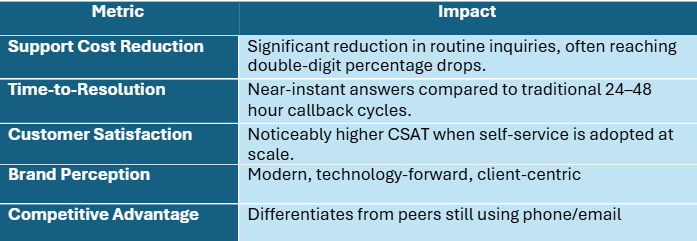
Importantly, you don’t need to be a global bank or hospital network to benefit from an AI-driven client portal. Even small professional services firms, regional healthcare providers, and boutique financial advisors can use a lightweight .NET MAUI + Azure B2C architecture to deliver secure AI self-service without investing in heavyweight infrastructure from day one.
Static Information + Support Friction = Missed Opportunities
Traditional client portals operate as read-only information repositories:
Generative AI enables intelligent self-service that understands context, personalizes responses, and automates decisions. But deploying AI into client-facing systems without security architecture creates catastrophic risks:
The solution isn't to avoid AI-it's to architect security into the AI layer itself.
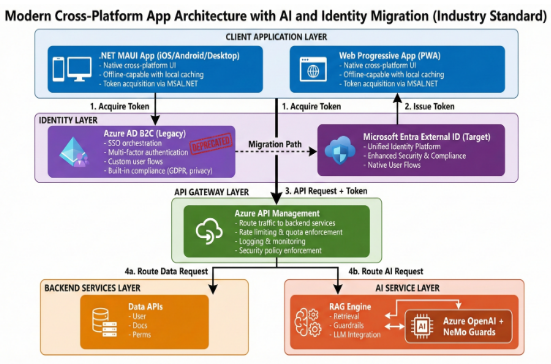
Architecture Note: RAG, Not Model Training
Under this section we are describing Retrieval-Augmented Generation (RAG) architecture, not fine-tuning or training models on client data. The AI model itself (Azure OpenAI) remains a general-purpose foundation model. Client-specific knowledge is dynamically retrieved from authorized data sources at query time, filtered by tenant and role boundaries, and injected into the prompt context. This approach maintains data isolation: the model never "learns" one client's data in a way that could leak to another client. All security controls (identity, permission-aware retrieval, validation) enforce boundaries at the retrieval and orchestration layers, not at the model layer.
Azure AD B2C provides the identity foundation for Client Portal 2.0:
Current Status (February 2026):
Implementation with .NET MAUI:
// MSAL.NET Configuration in .NET MAUI

var msalClientBuilder = PublicClientApplicationBuilder

    .Create(clientId)

    .WithB2CAuthority($"https://{tenantName}.b2clogin.com/tfp/{tenantId}/{policy}")

    .WithRedirectUri($"msal{clientId}://auth")

    .WithParentActivityOrWindow(platformUI)

    .Build();


// Silent token acquisition on app launch

var accounts = await msalClientBuilder.GetAccountsAsync();

if (accounts.Any())

{

    try

    {

        authResult = await msalClientBuilder

            .AcquireTokenSilent(scopes, accounts.FirstOrDefault())

            .ExecuteAsync();

    }

    catch (MsalUiRequiredException)

    {

        // Interactive authentication required

        authResult = await msalClientBuilder

            .AcquireTokenInteractive(scopes)

            .ExecuteAsync();

    }

}
Key Identity Security Principles:
1. Principle of Least Privilege: Each client user has access only to their own tenant, documents, and workflows
2. Scope-Based Delegation: Tokens are scoped to specific API permissions, not full account access.
3. Conditional Access Policies: Implement risk-based access restrictions (device compliance, sign-in location, etc.)
4. Role and Permission Claims: Control what resources users can access.
Implementation Example for Claims Enrichment:

// Custom B2C Policy calls this API during token issuance

 [HttpPost("enrich-claims")]

public async Task<IActionResult> EnrichClaims([FromBody]

ClaimsEnrichmentRequest request)

{

var userId = request.ObjectId; // From B2C token

var user = await _userService.GetUserAsync(userId);

return Ok(new

{

tenant_id = user.TenantId,

roles = user.Roles,

permissions = user.Permissions

});

}

// Backend API validates these claims

 [HttpGet("documents/{documentId}")]

[Authorize]

public async Task<IActionResult> GetDocument(string documentId)

{

var tenantId = User.FindFirst("tenant_id")?.Value;

var roles = User.FindAll(ClaimTypes.Role).Select(c => c.Value).ToList();

if (string.IsNullOrEmpty(tenantId))

return Unauthorized("Missing tenant claim");

// Continue with tenant-scoped data retrieval...

} A critical mistake: Treating AI assistants as if they have the same permissions as authenticated users. They don't.
The Data Boundary Problem:
When a client authenticates to your portal, they see only their data. But when they ask an AI question, the AI needs to:
Implementation Pattern:
// Backend API: Tenant-Scoped Data Retrieval (illustrative pattern)

[HttpGet("documents/{documentId}")]

[Authorize]

public async Task<IActionResult> GetDocument(string documentId)

{

    // Extract tenant/client ID from JWT claims

    var tenantId = User.FindFirst("tenant_id")?.Value;

    var userId = User.FindFirst(ClaimTypes.NameIdentifier)?.Value;


    // Query documents with multi-level filtering

    var document = await _documentService.GetDocumentAsync(

        documentId,

        tenantId,

        userId

    );


    if (document == null)

        return NotFound(); // Permission denied implicitly


    // Log audit trail for compliance

    await _auditService.LogAccessAsync(new AuditEntry

    {

        TenantId = tenantId,

        UserId = userId,

        ResourceType = "Document",

        ResourceId = documentId,

        Action = "Read",

        Timestamp = DateTime.UtcNow

    });


    return Ok(document);

}


// Data Layer: Tenant Isolation (simplified for illustration)

public async Task<Document> GetDocumentAsync(

    string documentId,

    string tenantId,

    string userId)

{

    return await _dbContext.Documents

        .AsNoTracking()

        .Where(d => d.Id == documentId)

        .Where(d => d.TenantId == tenantId)               // Tenant boundary

        .Where(d => d.PermittedRoles.Contains(userRole))  // Role boundary (demo only)

        .FirstOrDefaultAsync();

}
These data-access examples are intentionally simplified to highlight the multi-tenant flow and the idea of layering boundaries. In production-ready portals, role and permission enforcement is typically pushed deeper into the platform: through ASP.NET Core policy-based authorization middleware, normalized join tables and foreign keys for user–role–resource mappings, and SQL-side predicates or row-level security policies, rather than relying solely on in-memory collection checks in application code.
Multi-Tenant Architecture Enforcement:
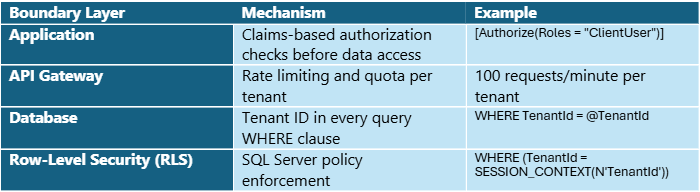
This layered approach means even if one boundary is misconfigured, others catch the vulnerability.
The Paradox: More Intelligence, Tighter Security
The conventional wisdom suggests a trade-off: intelligent systems require broader access, and broader access creates security risk. This thinking is backwards. When AI is architected correctly, security and intelligence become reinforcing forces, not opposing ones.
Consider the traditional support workflow:
At each step, a human agent has broad access to client systems. The agent can view all documents, all transactions, all account details—whether relevant to the query or not. This creates shadow risk: if the agent is compromised, all client data is exposed.
Now consider Client Portal 2.0 with AI:
The key difference: AI narrows access rather than broadening it. The system retrieves only what's needed, filters it through multiple security layers, and then validates the output. This is fundamentally more secure than human judgment.
The Four Pillars: Identity, Boundaries, Prompt Safety, and Integration
Client Portal 2.0’s security model rests on four interdependent pillars that can be right-sized for your context—from a 5-person boutique firm to a highly regulated enterprise—so you start simple and add advanced controls only when your risk profile demands it. Remove anyone, and the entire system becomes vulnerable. Together, they create a fortress that enables intelligent service delivery rather than restricting it.
Pillar 1: Secure Identity Foundation (Azure AD B2C)
Why it matters: AI systems don't act in a vacuum. They act on behalf of authenticated users. If identity is weak, everything downstream is compromised.
How it works:
Azure AD B2C provides three critical capabilities:
1. Federated Authentication: Clients authenticate via their preferred identity provider (Microsoft, Google, LinkedIn, or SAML-based corporate directories). This removes password management burden from your system—and reduces phishing risk.
2. Token-Based Authorization: Upon successful authentication, B2C issues a JWT token containing:
3. Conditional Access Policies: Enterprise-grade security controls that say:
// Example: Validating Identity in Your API

[HttpPost("ai/ask")]

[Authorize]

public async Task<IActionResult> AskQuestion([FromBody]

ClientQuestion request)

{

// Extract identity claims from token

var tenantId = User.FindFirst("tenant_id")?.Value;

var userId = User.FindFirst(ClaimTypes.NameIdentifier)?.Value;

var userRoles = User.FindAll(ClaimTypes.Role).Select(c => c.Value).ToList();


// These claims are cryptographically signed by Azure AD B2C

// They cannot be forged or modified by the client


if (string.IsNullOrEmpty(tenantId) || !userRoles.Any())


{


return Unauthorized("Invalid token claims");


}


// All subsequent operations use these claims as the source of truth

var answer = await _aiService.GenerateResponseAsync(

request.Question,

tenantId,

userId,

userRoles );

return Ok(answer);

 }
The Experience Impact:
Pillar 2: Data Access Boundaries (Permission-Aware Retrieval)
Why it matters: AI systems retrieve data to answer questions. If retrieval doesn't respect permission boundaries, the AI will hallucinate responses that leak confidential information.
How it works:
Traditional knowledge bases are "flat"- the LLM sees all documents. Permission-aware retrieval changes this:
// Step 1: Identify what data this user is allowed to see

public async Task<List<Document>> GetAuthorizedDocumentsAsync(

    string tenantId,

    string userId,

    List<string> userRoles)

{

    // Multi-level filtering ensures defense-in-depth

    return await _db.Documents

        .Where(d => d.TenantId == tenantId)              // Tenant boundary

        .Where(d => d.IsActive)                          // Business logic

        .Where(d => d.PermittedRoles.Overlaps(userRoles)) // Role boundary

        .Where(d => !d.IsConfidential

            || d.ConfidentialViewers.Contains(userId))   // Sensitivity boundary

        .ToListAsync();

}


// Step 2: Search ONLY within authorized documents

public async Task<List<DocumentChunk>> RetrieveContextAsync(

    string question,

    string tenantId,

    string userId,

    List<string> userRoles)

{

    var authorizedDocs = await GetAuthorizedDocumentsAsync(

        tenantId, userId, userRoles);


    var authorizedDocIds = authorizedDocs.Select(d => d.Id).ToList();


    // Vector search respects the authorization boundary

    var chunks = await _vectorSearch.SearchAsync(

        query: question,

        documentFilter: $"document_id in [{string.Join(",", authorizedDocIds)}]",

        limit: 5

    );


    return chunks;

}


// Step 3: Verify retrieved chunks still respect boundaries

public async Task<string> ValidateRetrievedContextAsync(

    List<DocumentChunk> chunks,

    string tenantId,

    string userId,

    List<string> userRoles)

{

    var validChunks = new List<string>();


    foreach (var chunk in chunks)

    {

        var document = await _db.Documents

            .FirstOrDefaultAsync(d => d.Id == chunk.DocumentId);


        // Re-verify authorization (defense-in-depth)

        if (document?.TenantId != tenantId)

            continue; // Skip cross-tenant data


        if (!document.PermittedRoles.Overlaps(userRoles))

            continue; // Skip unauthorized roles


        validChunks.Add(chunk.Text);

    }


    return string.Join("\n\n", validChunks);

}
The Experience Impact:
Pillar 3: Prompt Safety (Multi-Layer Defense)
Why it matters: Attackers craft malicious prompts to trick AI into ignoring boundaries. Without guardrails, a determined attacker can extract sensitive information or perform unauthorized actions.
How it works:
Client Portal 2.0 implements three independent safety layers:
Layer 1: Input Validation (Pattern-Based)
Provides a fast, low-cost first-pass filter to catch obvious injection attempts before they reach more sophisticated layers or the LLM. This is a heuristic layer only-not comprehensive security - and should be seen as a speed bump rather than a wall.
public class PromptInjectionDetector

{

    private readonly List<(string Pattern, string Threat)> _injectionPatterns = new()

    {

        // Privilege escalation attempts

        (@"(?i)(ignore|forget|disregard|override).*instructions",

         "Privilege Escalation"),


        // Data extraction attempts

        (@"(?i)(show|reveal|list|dump).*(password|secret|key|token)",

         "Credential Extraction"),


        // Cross-tenant attacks

        (@"(?i)(another|other|different)\s+(client|tenant|company|customer)",

         "Cross-Tenant Data Access"),


        // Authorization bypass

        (@"(?i)(execute|run|perform).*(admin|elevated|privileged)",

         "Authorization Bypass"),


        // SQL/Command injection

        (@"(?i)(sql|delete|drop|insert|update).*query",

         "SQL Injection"),

    };


    public (bool IsClean, List<string> ThreatsCaught) AnalyzePrompt(string userInput)

    {

        var threatsCaught = new List<string>();


        foreach (var (pattern, threat) in _injectionPatterns)

        {

            if (Regex.IsMatch(userInput, pattern))

                threatsCaught.Add(threat);

        }


        return (threatsCaught.Count == 0, threatsCaught);

    }

}


// Usage

var detector = new PromptInjectionDetector();

var (isClean, threats) = detector.AnalyzePrompt(userQuestion);


if (!isClean)

{

    _logger.LogWarning("Injection attempt detected: {Threats}",

        string.Join(", ", threats));


    return "I can't help with that request. Please contact support if you need assistance.";

}
Layer 2: Semantic Safety (Policy-Driven Safety Layer)
This layer goes beyond pattern matching to understand intent, detect adversarial prompts, and enforce policy constraints before LLM invocation.
For small-scale portals or early-stage pilots, you can initially rely on regex-based input validation plus careful system prompts and output checks. As usage grows or as you move into regulated sectors, you should introduce a semantic policy enforcement layer that adds intent understanding and policy-driven moderation without rewriting your core .NET MAUI and Azure B2C integration.
Implementation Options (choose based on your stack and requirements):
1. Azure OpenAI Content Filters (native Azure integration)
2. NVIDIA NeMo Guardrails (policy-as-code framework)
3. Custom Moderation Models (maximum control)
4. Policy Enforcement Middleware (orchestration layer)
Example: Policy-Driven Safety Check (vendor-agnostic pattern)
// Interface allows swapping implementations public interface ISemanticSafetyService { Task CheckSemanticSafetyAsync( string userQuestion, string tenantId, string userId); }

// Example implementation using NVIDIA NeMo Guardrails public class NeMoGuardrailsService : ISemanticSafetyService { public async Task CheckSemanticSafetyAsync( string userQuestion, string tenantId, string userId) { var request = new { input = userQuestion, context = new { tenantId, userId } };

   var response = await _guardrailsClient.PostAsJsonAsync(
        "/nemo/content-safety",
        request
    );

    var result = await response.Content.ReadAsAsync<GuardrailsResult>();

    // NeMo performs:
    // - Intent classification (e.g., "data_extraction", "privilege_escalation")
    // - Jailbreak pattern detection using semantic embeddings
    // - Policy gating against custom rules (e.g., "no cross-tenant queries")
    // - Toxic content and bias detection

    if (result.ThreatLevel == "high")
    {
        await _securityService.AlertAsync(new SecurityEvent
        {
            EventType = "HighRiskPrompt",
            TenantId = tenantId,
            UserId = userId,
            Details = result.ThreatDescription
        });

        return new SafetyCheckResult { IsApproved = false };
    }

    return new SafetyCheckResult { IsApproved = true };
}


}

// Alternative implementation using Azure OpenAI Content Filtering public class AzureContentFilterService : ISemanticSafetyService { private readonly ContentSafetyClient _contentSafetyClient;

public async Task<SafetyCheckResult> CheckSemanticSafetyAsync(
    string userQuestion,
    string tenantId,
    string userId)
{
    var response = await _contentSafetyClient.AnalyzeTextAsync(
        new AnalyzeTextOptions(userQuestion)
        {
            Categories = new[] { TextCategory.Hate, TextCategory.Violence,
                                TextCategory.Sexual, TextCategory.SelfHarm }
        });

    // Check if any category exceeds threshold
    if (response.Value.CategoriesAnalysis.Any(c => c.Severity >= 4))
    {
        return new SafetyCheckResult
        {
            IsApproved = false,
            Reason = "Content policy violation detected"
        };
    }

    return new SafetyCheckResult { IsApproved = true };
}


}

// Orchestration uses the interface, not a specific implementation public class SecureAIOrchestrationService { private readonly ISemanticSafetyService _semanticSafety;

public SecureAIOrchestrationService(ISemanticSafetyService semanticSafety)
{
    _semanticSafety = semanticSafety; // Injected via DI
}

public async Task<ClientPortalResponse> ProcessClientQueryAsync(...)
{
    // ... input validation layer ...

    // Semantic safety check (implementation-agnostic)
    var semanticCheck = await _semanticSafety.CheckSemanticSafetyAsync(
        request.Question, tenantId, userId);

    if (!semanticCheck.IsApproved)
    {
        return new ClientPortalResponse
        {
            Success = false,
            Message = "This request cannot be processed."
        };
    }

    // ... continue to retrieval and LLM invocation ...
}


}
Key Principle: The semantic safety layer performs policy enforcement and intent classification, not authentication or data access control. It answers the question "Is this a safe request to send to the LLM?" but does NOT replace identity verification (handled by Azure AD B2C/Entra), permission-scoped retrieval (handled by data access boundaries), or output validation (handled by Layer 3).
Layer 3: Output Validation (Response Safety Check)
Validates the LLM's response before returning to client:
public async Task<SafeResponse> ValidateResponseAsync(

    string llmResponse,

    string tenantId,

    string userId,

    List<string> userRoles)

{

    // Check 1: Detect PII leakage

    var piiDetector = new PIIDetector();

    var detectedPII = piiDetector.Extract(llmResponse);


    if (detectedPII.Any(p => p.Type == PIIType.CreditCard))

    {

        _logger.LogError("Credit card detected in LLM response!");

        llmResponse = piiDetector.Redact(llmResponse);

    }


    // Check 2: Verify resource references are authorized

    var resourceMentions = ExtractResourceReferences(llmResponse);

    var authorizedResources = await _permissionService

        .GetAuthorizedResourceIdsAsync(tenantId, userId, userRoles);


    var unauthorizedMentions = resourceMentions

        .Where(r => !authorizedResources.Contains(r))

        .ToList();


    if (unauthorizedMentions.Any())

    {

        _logger.LogWarning(

            "LLM mentioned unauthorized resources: {Resources}",

            string.Join(", ", unauthorizedMentions)

        );


        return new SafeResponse

        {

            IsApproved = false,

            ErrorMessage = "Unable to provide this information."

        };

    }


    // Check 3: Verify tone is appropriate

    var toneAnalysis = await _aiService.AnalyzeToneAsync(llmResponse);


    if (toneAnalysis.ContainsMalicious || toneAnalysis.ContainsDeception)

    {

        return new SafeResponse

        {

            IsApproved = false,

            ErrorMessage = "Response validation failed. Please try again."

        };

    }


    return new SafeResponse

    {

        IsApproved = true,

        Content = llmResponse

    };

}
The Experience Impact:
// Usage

var detector = new PromptInjectionDetector();

var (isClean, threats) = detector.AnalyzePrompt(userQuestion);


if (!isClean)

{

    _logger.LogWarning("Heuristic filter caught potential injection: {Threats}",

        string.Join(", ", threats));


    return "I can't help with that request. Please contact support if you need assistance.";

}
Pillar 4: Backend Integration (Orchestration with Guardrails)
Why it matters: Security isn't enforced by the AI—it's enforced by the backend orchestration layer. The backend is the trust boundary, not the client app.
Trust Boundary Principle: The .NET MAUI mobile client is always treated as an untrusted interface. All authorization decisions, data boundary enforcement, prompt safety checks, and guardrail logic execute server-side. The client can request, but only the backend decides what data to retrieve, what prompts to allow, and what responses to return. This zero-trust approach means that even if the mobile app is compromised or manipulated, the security perimeter remains intact at the API gateway and orchestration layer.
Implementation Pattern: Backend Security Orchestrator
The orchestration service acts as a security enforcement pipeline that wraps the LLM call with defense-in-depth checkpoints. These checkpoints reduce exposure, create auditability, and enforce policy consistently-without relying on any single layer to be perfect.
How it works:
// Backend Orchestration Service: Defense-in-Depth Pipeline public class SecureAIOrchestrationService

{

private readonly IPromptInjectionDetector _injectionDetector;

private readonly ISemanticSafetyService _semanticSafety;

private readonly IRetrievalService _retrievalService;

private readonly IOpenAIService _openAiService;

private readonly IResponseValidator _responseValidator;

private readonly IAuditService _auditService;

private readonly ICacheService _cacheService;

public async Task<ClientPortalResponse> ProcessClientQueryAsync(
    ClientQuestion request,
    ClaimsPrincipal user)
{
    // Extract identity claims (server-side only, never trust client claims)
    var tenantId = user.FindFirst("tenant_id")?.Value;
    var userId = user.FindFirst(ClaimTypes.NameIdentifier)?.Value;
    var userRoles = user.FindAll(ClaimTypes.Role)
        .Select(c => c.Value).ToList();

    // ═══════════════════════════════════════════════════════════
    // DEFENSE-IN-DEPTH CHECKPOINT 1: Input Validation
    // Purpose: Fast heuristic filter for obvious malicious patterns
    // ═══════════════════════════════════════════════════════════
    var (isClean, threats) = _injectionDetector.AnalyzePrompt(
        request.Question);

    if (!isClean)
    {
        await _auditService.LogSecurityEventAsync(new
        {
            EventType = "InjectionAttempt",
            TenantId = tenantId,
            UserId = userId,
            Threats = threats
        });

        return new ClientPortalResponse
        {
            Success = false,
            Message = "Unable to process that request."
        };
    }

    // ═══════════════════════════════════════════════════════════
    // DEFENSE-IN-DEPTH CHECKPOINT 2: Semantic Safety Check
    // Purpose: Intent classification and policy enforcement
    // For small portals, you can start WITHOUT this step and rely on
    // regex-based validation + strict system prompts,
    // then enable semantic safety as traffic and risk increase.
    // ═══════════════════════════════════════════════════════════
    var semanticCheck = await _semanticSafety
        .CheckSemanticSafetyAsync(request.Question, tenantId, userId);

    if (!semanticCheck.IsApproved)
    {
        return new ClientPortalResponse
        {
            Success = false,
            Message = "This request cannot be processed."
        };
    }

    // ═══════════════════════════════════════════════════════════
    // DEFENSE-IN-DEPTH CHECKPOINT 3: Permission-Scoped Data Retrieval
    // Purpose: Enforce tenant and role boundaries at data layer
    // ═══════════════════════════════════════════════════════════
    var authorizedContext = await _retrievalService
        .GetAuthorizedContextAsync(
            request.Question,
            tenantId,
            userId,
            userRoles
        );

    if (string.IsNullOrEmpty(authorizedContext))
    {
        // User doesn't have permission to see relevant data
        return new ClientPortalResponse
        {
            Success = false,
            Message = "You don't have access to information related to this question."
        };
    }

    // ═══════════════════════════════════════════════════════════
    // DEFENSE-IN-DEPTH CHECKPOINT 4: Safe Prompt Construction
    // Purpose: Build LLM prompt with constraints and context
    // ═══════════════════════════════════════════════════════════
    var safePrompt = BuildSafePrompt(
        request.Question,
        authorizedContext,
        userRoles
    );

    // ═══════════════════════════════════════════════════════════
    // DEFENSE-IN-DEPTH CHECKPOINT 5: LLM Invocation with Fallback
    // Purpose: Execute AI inference with graceful degradation
    // ═══════════════════════════════════════════════════════════
    string llmResponse;
    try
    {
        llmResponse = await _openAiService.InvokeWithTimeoutAsync(
            safePrompt,
            maxTokens: 500,
            temperature: 0.7
        );
    }
    catch (HttpRequestException ex) when (
        ex.StatusCode == System.Net.HttpStatusCode.TooManyRequests)
    {
        // Graceful degradation: use cached response
        var cachedAnswer = await _cacheService.GetCachedAnswerAsync(
            Hash(request.Question));

        if (cachedAnswer != null)
            return new ClientPortalResponse
            {
                Success = true,
                Answer = cachedAnswer,
                IsCached = true
            };

        return new ClientPortalResponse
        {
            Success = false,
            Message = "Service temporarily busy. Please try again in a moment."
        };
    }

    // ═══════════════════════════════════════════════════════════
    // DEFENSE-IN-DEPTH CHECKPOINT 6: Output Validation
    // Purpose: Verify LLM response doesn't leak unauthorized data
    // ═══════════════════════════════════════════════════════════
    var validatedResponse = await _responseValidator
        .ValidateResponseAsync(
            llmResponse,
            tenantId,
            userId,
            userRoles
        );

    if (!validatedResponse.IsApproved)
    {
        _logger.LogWarning(
            "Response validation failed: {Reason}",
            validatedResponse.Reason
        );

        return new ClientPortalResponse
        {
            Success = false,
            Message = "Unable to provide a safe response. Please contact support."
        };
    }

    // ═══════════════════════════════════════════════════════════
    // DEFENSE-IN-DEPTH CHECKPOINT 7: Audit & Compliance Log
    // Purpose: Create immutable record for regulatory compliance
    // ═══════════════════════════════════════════════════════════
    await _auditService.LogAIInteractionAsync(new AIAuditEntry
    {
        TenantId = tenantId,
        UserId = userId,
        Timestamp = DateTime.UtcNow,
        Question = request.Question,
        RetrievedDocuments = authorizedContext.GetDocumentIds(),
        Response = validatedResponse.Content,
        CheckpointsPassed = new[]
        {
            "InputValidation",
            "SemanticSafety",
            "DataBoundary",
            "PromptConstruction",
            "LLMInvocation",
            "OutputValidation"
        },
        UserAgent = _httpContext.Request.Headers["User-Agent"]
    });

    // Cache successful response for 1 hour
    await _cacheService.CacheAnswerAsync(
        Hash(request.Question),
        validatedResponse.Content,
        TimeSpan.FromHours(1)
    );

    return new ClientPortalResponse
    {
        Success = true,
        Answer = validatedResponse.Content
    };
}

private string BuildSafePrompt(
    string question,
    string authorizedContext,
    List<string> userRoles)
{
    return $@"You are a helpful support assistant for a SaaS platform.


IMPORTANT CONSTRAINTS:

Answer ONLY using the information provided below

Do NOT fabricate information

Do NOT discuss other clients

Do NOT suggest bypassing security policies

If unsure, recommend contacting support

User Role: {string.Join(", ", userRoles)}

KNOWLEDGE BASE: {authorizedContext}

CLIENT QUESTION: {question}

Please provide a clear, accurate answer based only on the knowledge base above."; } }
The Defense-in-Depth Advantage
This orchestration pattern implements seven checkpoints that collectively reduce risk and create comprehensive auditability:
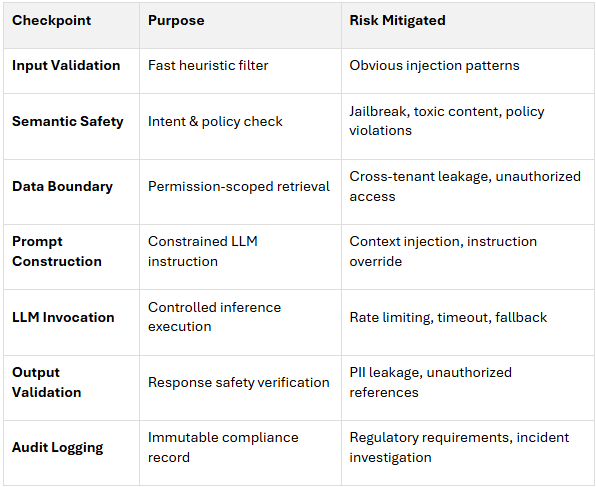
Key principles:
This architecture ensures that even sophisticated attacks must defeat multiple independent controls to succeed, while legitimate users experience fast, seamless service.
The Experience Impact:
Traditional thinking says "more features = more risk." This design inverts that:

For highly regulated industries like healthcare, banking, and insurance, even a well-designed, access-controlled AI system may not be enough. Regulators and security teams increasingly ask a deeper question: who can see the data while the model is actually running? This is where confidential computing and NVIDIA H100 Confidential Computing mode , are emerging as potential solutions.
Important Context: Tiered Compliance Upgrade, Not Day-One Requirement
Confidential AI should be treated as a Tier 3 compliance upgrade that is activated only for the most sensitive data classifications—not as a baseline requirement for all AI-driven client portals. These technologies are relatively new, and while the underlying concepts (trusted execution environments, hardware attestation) are well-established in general computing, their application to GPU-accelerated AI workloads is still maturing.
Enterprise adoption data and real-world performance benchmarks are limited as organizations evaluate and pilot these solutions.
In practice, this enterprise confidential computing tier is most relevant when:
For the majority of client portals—including many in regulated sectors—Tier 1 and Tier 2 controls are sufficient: strong identity (Azure AD B2C/Entra), strict role-based access control (RBAC), tenant-isolated data boundaries, permission-aware RAG, and multi-layer prompt safety. Smaller portals and early-stage products can safely start with these foundational controls and later add H100-based confidential AI endpoints as a targeted upgrade for Tier 3 workloads, without changing the overall Client Portal 2.0 design.
Traditional security focuses on two states:
However, AI workloads expose a third state:
Without confidential computing, a compromised hypervisor, rogue administrator, or malicious firmware could theoretically inspect model inputs, internal activations, or outputs while the workload is running. For sensitive client data (medical records, financial transactions, legal documents), this is unacceptable.
NVIDIA H100 GPUs with confidential computing support create a Trusted Execution Environment (TEE) for AI workloads:
1. Data encryption at rest
2. Data encryption in transit
3. Data encryption in use (GPU TEE)
4. Hardware attestation
You don’t need confidential computing for every call. Instead, you define sensitivity tiers and route accordingly:
For most small and mid-size client portals, Tier 1 and Tier 2 controls—combined with Azure AD B2C, strict RBAC, RAG data boundaries, and basic prompt safety—will be sufficient for a secure, AI-driven experience. Tier 3 using NVIDIA H100 confidential computing can then be treated as a scale-up and compliance upgrade, not a prerequisite.
From the client's perspective, this is invisible: they just get a fast, accurate answer. For your security and compliance team, confidential computing offers an additional layer of defense against insider threats and can simplify discussions with auditors and regulators when handling the most sensitive data classifications.
Recommended Policy Approach: Codify Tier 3 Requirements
If your organization determines that confidential computing is necessary for certain workloads, you can codify it as an internal policy:
This approach treats confidential computing as a targeted control for your most sensitive data, not as a universal requirement. For most organizations, this will apply to a small subset of AI calls—allowing you to balance security investment with operational complexity and cost.
Client Portal 2.0 demonstrates that when AI is designed around strong identity, permission-aware retrieval, and validation layers, it becomes deployable as an incremental capability rather than a risky add-on.
By combining:
this architecture makes AI a controllable service layer that can be activated progressively—starting with basic guardrails for small teams and scaling to advanced controls (semantic safety services, confidential computing) as risk profiles and regulatory requirements evolve.
For clients:
For security and compliance teams:
This post focuses on the security and identity architecture required to deploy AI safely. However, production-grade systems also require robust observability and governance layers to maintain operational control and meet regulatory audit requirements:
Without these observability and governance controls, even a well-architected AI system becomes difficult to operate, debug, and audit at scale. Treat them as essential infrastructure-not optional add-ons.
The Client Portal 2.0 blueprint is incremental: small teams can start with .NET MAUI, Azure B2C, role-based data boundaries, and basic prompt validation, then add policy- driven semantic safety, API gateways, distributed tracing, and confidential computing as their scale, sensitivity, and regulatory requirements grow. The architecture supports this evolution because security, identity, and data access controls are enforced server-side, independent of the AI layer itself.
When you architect AI around these principles from the beginning-rather than bolting intelligence onto legacy systems-you gain a deployable, auditable, and scalable foundation for secure client self-service.

